

Know Exactly What Happens
After You Send a Document
See who actually reads your document, how they engage, and what signals real interest,
so you know when to follow up.
Built for sales proposals, pitch decks, contracts, and sensitive documents.
From Document Upload to Reader Engagement in Three Simple Stages
Upload your document, share a secure link, and see exactly how people engage after send.
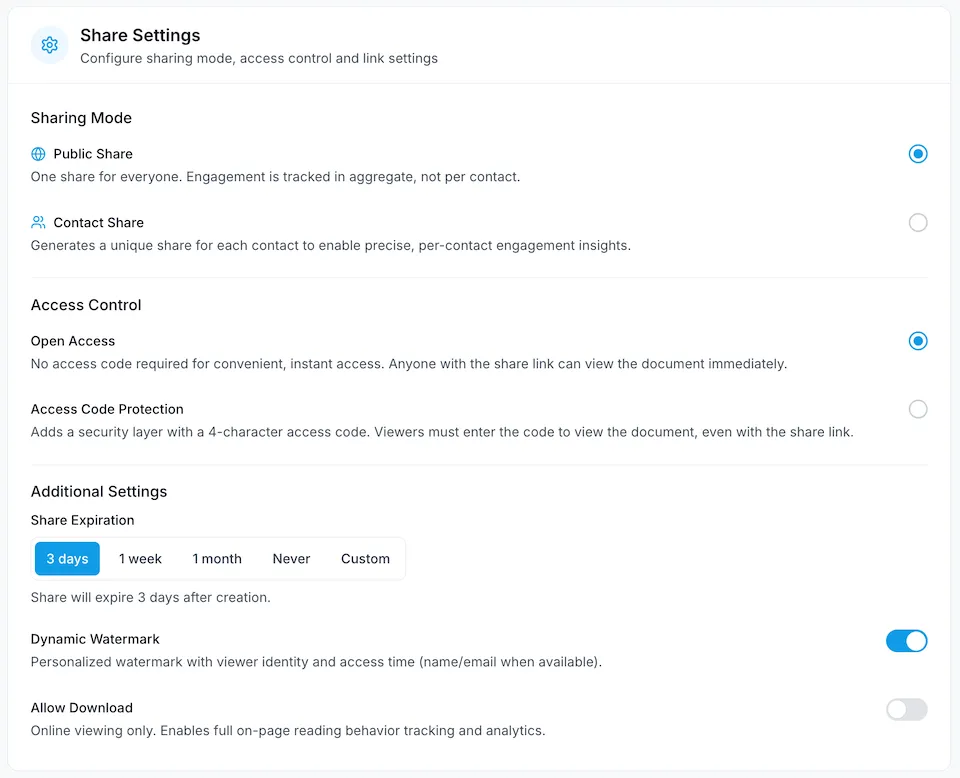
Upload and Configure Your Document
Add details, set access controls, and prepare your document for secure sharing.
Secure Document Sharing with Document Tracking and Engagement Analytics
DocBeacon lets you share proposals, pitch decks, and sensitive documents through secure links, so you can see who engaged and follow up with confidence.
Real-Time Document Analytics
Track views, reading time, and drop-off points to understand document performance and which pages keep readers engaged.
Contact-Level Link Tracking
Create unique links for each contact and track who opened your document, when they viewed it, and how they engaged.
Secure Sharing Controls
Protect every shared document with passwords, expiration dates, download restrictions, and viewer-specific watermarks.
Engagement Heatmaps
Use heatmaps to see where readers focus, where they skim, and what content gets ignored.
Enterprise Security
Protect sensitive documents with encryption, access controls, and secure infrastructure built for business-critical sharing.
Engagement Overview
Monitor views, reading time, engagement trends, and recent activity in one place so your team can quickly spot what needs attention.
How Teams Apply DocBeacon
Explore how teams use DocBeacon across sales, fundraising, investor updates, and secure document sharing workflows.
Fundraising Updates
Share investor updates through secure links and see what gets attention after they are sent. Understand which updates are being viewed and revisited.
Sales Proposals
Track proposal engagement, see which pages keep prospects reading, and follow up with better timing after sending.
Investor Relations
Give investors a clear, secure way to access updates while your team gains visibility into what gets viewed and revisited.
Secure Client Sharing
Share sensitive client documents with passwords, expiration dates, and viewer-specific watermarks for stronger control outside your organization.
Team Visibility
Monitor views, reading time, and recent activity in one place so your team can quickly see what needs attention next.
Document Engagement Review
See how readers move through important documents and which sections capture the most attention across proposals, decks, and updates.
Frequently Asked Questions
Answers to common questions about secure document sharing, tracking, analytics, and access controls.
Yes. DocBeacon shows who opened your document, when they viewed it, total reading time, and time spent on each page. You can also see repeat visits and overall engagement patterns.
Yes. With a view-only link, viewers can open the document in their browser without downloading or printing it. You can also add viewer-specific watermarks to discourage unauthorized sharing.
Yes. You can protect links with passwords and set custom expiration dates. Once a link expires, the document can no longer be accessed through that URL.
Yes. DocBeacon combines page-level analytics with section-level heatmaps, so you can understand both overall page performance and where readers focus within each page.
Yes. You can create unique links for individual contacts and track engagement by contact, including views, time spent, repeat visits, and activity across documents.
DocBeacon combines secure document sharing with deeper engagement visibility, including contact-level tracking, heatmaps, and page-level analytics. It is built for teams that want more insight into how documents are read after sending.
DocBeacon protects documents with encryption in transit and at rest, along with controls such as passwords, link expiration, view-only access, and viewer-specific watermarks. These features help teams share sensitive documents with more control.
Start Sharing Documents with More Visibility
Create secure links, track engagement, and understand what gets attention after you send.