
Contact-level tracking for every shared document link
DocBeacon records every viewing session and download attempt from your share links in real time. See who opened the document, how long they stayed on each session, and whether they came back—without spinning up another dashboard. Need inspiration? Read the document tracking guide on our blog.
Everything every link reports—without extra tooling
Link tracking uses the same telemetry DocBeacon applies to document analytics. Sessions are logged within seconds and rolled into ShareAnalytics so you can compare links, review heatmap-ready dwell data, and export totals for stakeholders.
Every share link automatically counts total views, unique visitors, downloads, and average read time so teams across finance, legal, and GTM roles can prioritize faster. Browse real-world scenarios in our use case library.
The real-time session feed surfaces timestamps, scroll depth, and device hints so you can react the moment a reader comes back. For a deeper walkthrough, read the document tracking playbook on our blog.
Contact-level tracking binds every visit to a person, letting sales, legal, or investor relations teams jump straight into ShareAnalytics and the Activity timeline without spinning up more tooling.
Real-time session feed
Every open of a DocBeacon link is logged immediately with timestamp, view duration, scroll depth, and download attempts so you know when someone is reading.
Share-level analytics
ShareAnalytics aggregates totals per link: views, unique viewers, total duration, average read time, max scroll, visited pages, downloads, and engagement score.
Page and heatmap context
Slice dwell data and visited pages flow directly into Document Analytics and heatmaps, so you can see which slide or clause held attention.
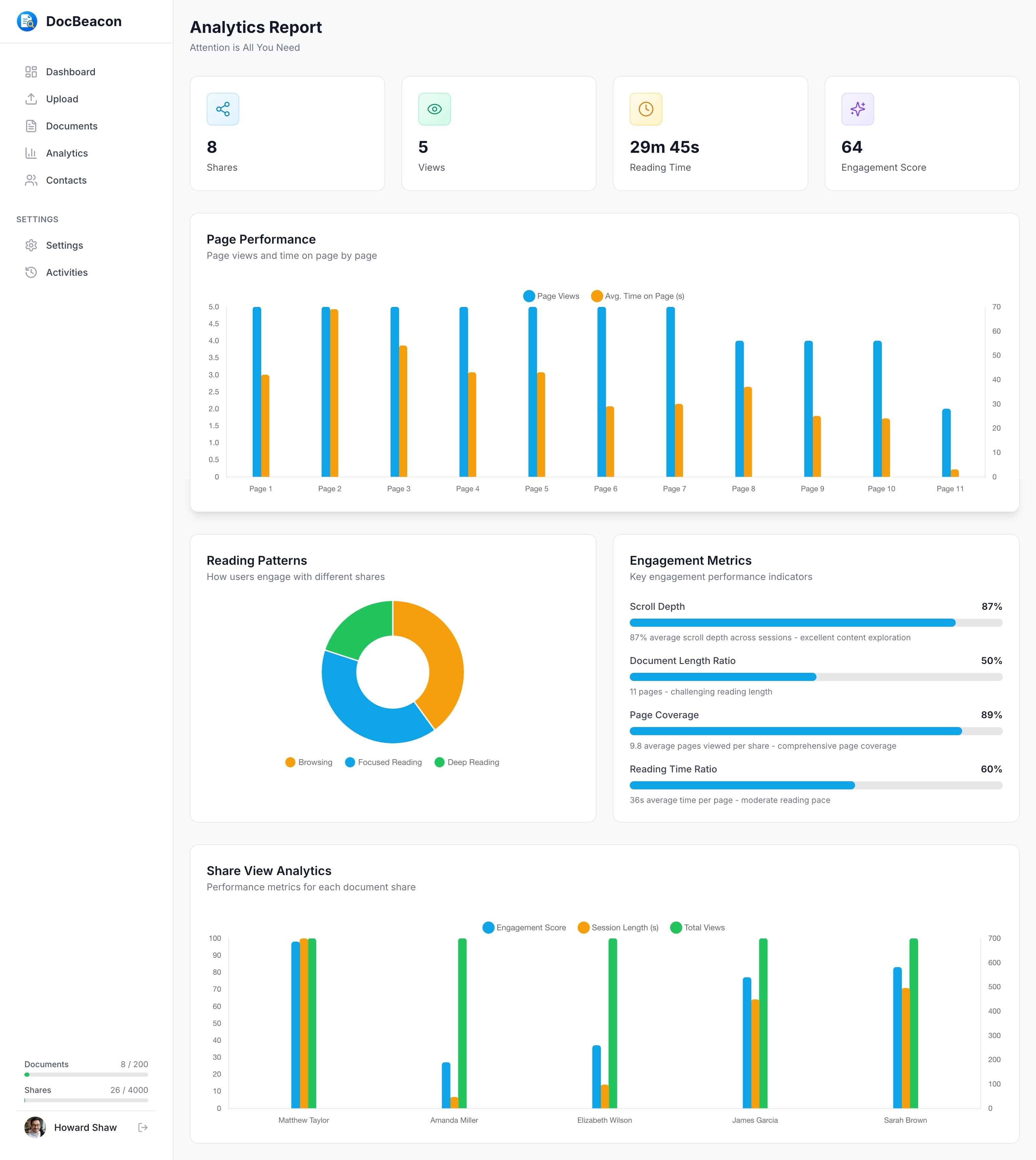
Share-level analytics with views, unique viewers, read time, and downloads.
Tie every visit back to a contact
Use the same Share Settings drawer to assign a contact, choose access controls, and publish the link. Link tracking inherits those settings automatically, so following up is as simple as checking the activity timeline.
Assign a contact to the link
Choose an existing contact or capture a new one in Share Settings. Engagement is mapped to that identity, while public links fall back to Guest or Public visitor labels.
Layer security controls together
Add access codes, expirations, disable-download, and dynamic watermarking without creating extra links. Link tracking respects the same permissions as Access Control.
Review the audit-ready trail
ShareAnalytics and the Activity timeline show who opened, how long they stayed, if they downloaded, and whether they returned—evidence you can export or reference in follow-ups.
Where link tracking matters most
Teams rely on DocBeacon to answer the same question faster: did they read it, and what should we do next? Link tracking removes guesswork without forcing you into heavy data-room workflows.
Sales and RevOps
- •Prioritize deals the moment a buyer reopens pricing or security responses.
- •Alert account teams when a shared deck gets forwarded or viewed by new stakeholders.
- •Correlate reading time with pipeline stages inside your CRM notes.
Learn more in how to track document views.
Legal and compliance reviews
- •Verify which party opened which redline before approving the next revision.
- •Capture a traceable record of every download attempt on sensitive agreements.
- •Combine access codes with link tracking for dual verification in regulated workflows.
Learn more in view-only document sharing for legal teams.
Investor and board updates
- •Track who actually read quarterly letters or KPIs ahead of meetings.
- •Use re-engagement alerts to time follow-up calls after a deck is revisited.
- •Maintain an audit trail for every board packet without spinning up a full data room.
Learn more in fundraising pitch deck analytics.
Frequently Asked Questions
What data does DocBeacon capture for each link?
Each session records timestamp, session ID, view duration, scroll depth, download count, viewer IP, and device agent. Aggregated analytics summarize total and unique views, total duration, average read time, visited pages, max scroll depth, and engagement scores for every share.
Can I see exactly who opened my document?
Yes when a contact is assigned to the link. DocBeacon maps every view back to that contact, including timestamps and follow-up visits. Public links still provide aggregated metrics and mark viewers as Guest or Public Link Visitor if no identity is supplied.
How fast are link analytics updated?
Tracking data writes directly to DocBeacon's share tracking service and updates dashboards within seconds. Engagement rolls up to ShareAnalytics and Document Analytics continuously, so you are not waiting for nightly batches.
Does link tracking respect access controls?
Yes. Access codes, disable-download, expirations, and dynamic watermarking all apply before a session is logged. If a viewer fails verification the attempt is not counted as a view.
How is link tracking different from document analytics?
Link tracking focuses on the individual share URL—who opened, when they returned, how long they stayed, and whether they downloaded. Document analytics aggregates all shares of a document to highlight overall performance and heatmaps. Both data sets are powered by the same tracking events.
Know exactly who read it—and when
Turn every shared link into a clear engagement trail. DocBeacon pairs link tracking with document analytics, heatmaps, and access controls so you can act the moment someone opens the file.