
Advanced Access Controls
Secure your documents with enterprise-grade access controls. Set access codes, expiration dates, download controls, and more to ensure your sensitive information stays protected.
Complete Access Control
DocBeacon provides layered access control across every share: choose public or individual links, gate access with passcodes, schedule link expirations, toggle downloads for view-only protection, identify viewers, and apply watermark overlays. Built for sales proposals, finance documents, investor updates, and secure internal collaboration.
Sharing Mode
Choose Public links for broad distribution and aggregate analytics, orIndividual links for recipient-specific tracking, revocation, and audit correlation. Issue multiple links per document to serve different audiences without changing the original file.
Access Code Protection
Enable passcode gating to protect sensitive shares. When access-code protection is on, DocBeacon automatically assigns a unique passcode to every share link. Entered codes are never stored or logged — the system only verifies correctness to grant access.
Link Expiration
Set per-link expiration windows (e.g., 3 days, 1 week, 1 month, or custom dates). Expired links automatically revoke access while preserving analytics and audit trails for later review.
Download Controls
Keep files strictly view-only by disabling Allow Download on a share link. Once disabled, downloads remain permanently off for that link and cannot be turned back on. For better reading-behavior tracking and to reduce uncontrolled redistribution, we strongly recommend keeping Allow Download disabled.
Viewer Identification
Assign an identity to every share link by adding a new contact or selecting one from Contact Management. Engagement is mapped to that contact, so you can confirm exactly who viewed the share. Public sharesprovide aggregate traffic only and cannot identify readers — use them sparingly when attribution is required.
Watermark Protection
Apply text or image overlays to discourage unauthorized redistribution. Watermarks can include viewer details and timestamps to provide clear deterrence while preserving readability.
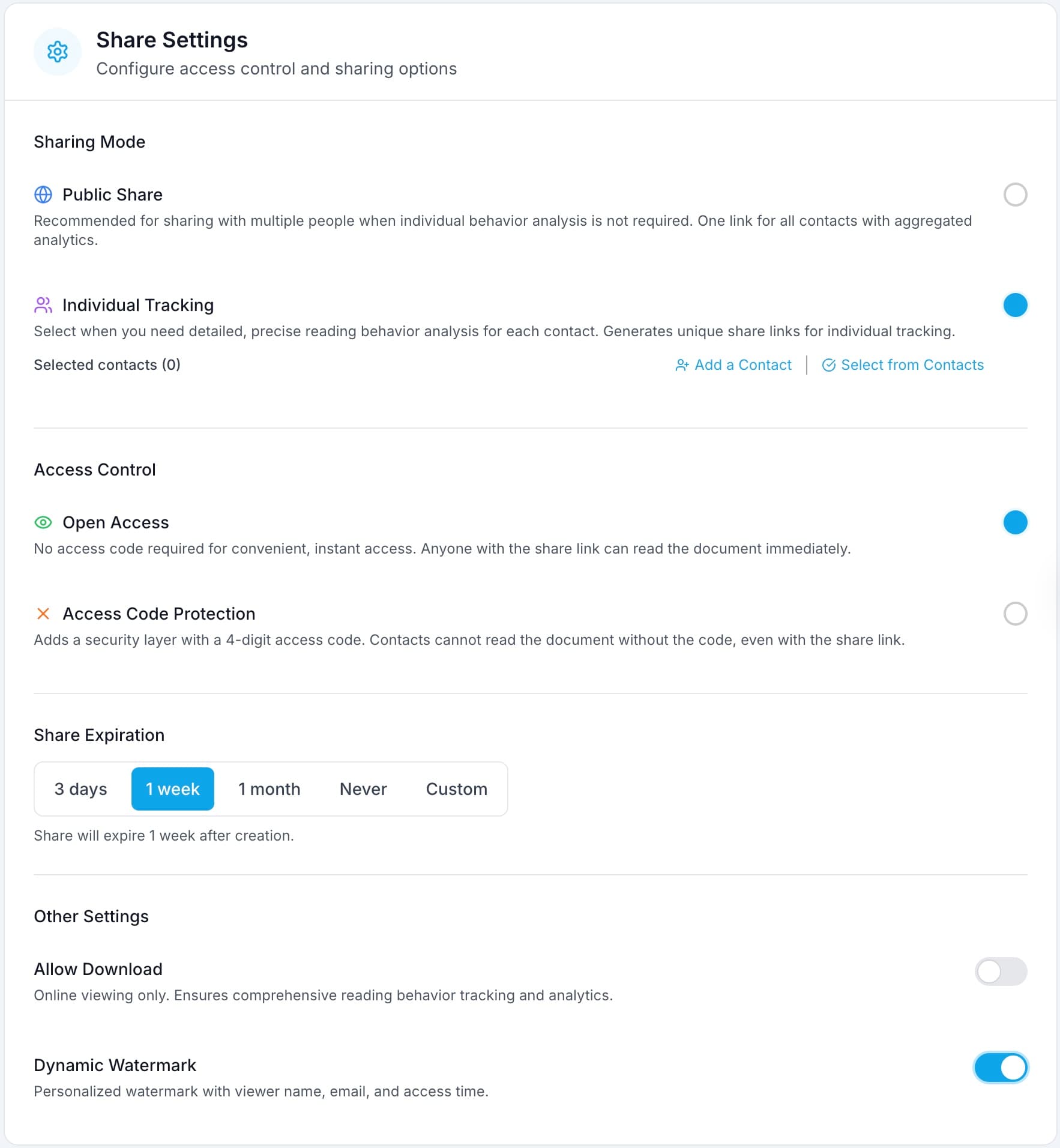
Share settings example with access controls.
Security for Every Scenario
Sales Proposals
Share sales proposals with prospects while maintaining control and credibility. Prevent off-platform forwarding, set time-bound access, and understand which sections get the most attention.
- Access code + watermark
- Automatic link expiration
- View-only access
Client Proposals & Contracts
Share proposals and contracts with clients while maintaining control and tracking engagement.
- Access codes for clients
- Time-limited access
- Download controls
- Engagement tracking
Investor Relations
Share pitch decks and investor updates with controlled access and detailed analytics. See the Pitch Deck Analytics: Benchmark Report on Investor Reading Behavior to understand which slides investors scrutinize before commitments.
- Access control per investor link
- Public or individual links
- Watermark protection
- Investor engagement analytics
Internal Team Sharing
Share internal documents with team members while maintaining security and compliance.
- Share with access codes
- Public or individual links
- Watermark protection
- Activity monitoring
Frequently Asked Questions
What is an access code and how is it used?
An access code is a short passcode that gates a share link. When access-code protection is enabled, DocBeacon assigns a unique passcode to every share link. Entered codes are never stored or logged — they are verified only to grant access.
Can I set different expirations per link?
Yes. Each share link can have its own expiration date or duration (e.g., 3 days, 1 week, 1 month). When it expires, access is automatically revoked while analytics and audit history remain preserved.
How do I disable downloads for view-only access?
Disable the Allow Download option at the link level. Once disabled, downloads are permanently off for that link and cannot be turned back on. For better reading-behavior tracking and reduced redistribution risk, we strongly recommend keeping Allow Download disabled.
Does DocBeacon support watermark overlays?
Yes. Apply text or image watermarks to discourage unauthorized redistribution. Contextual overlays can include viewer details and timestamps.
What viewer identification is captured?
Assign an identity to each share link by adding a contact or selecting one from Contact Management. Engagement is mapped to that contact, so you can confirm exactly who viewed the share. Public shares provide only aggregate traffic and cannot identify readers; use them sparingly when attribution is required.
Secure Your Document Sharing
Take control of who accesses your documents with advanced security features.