
Dynamic Watermarks for Every Viewer
DocBeacon overlays every page with a live fingerprint that shows who opened the document and when. Pair watermarking with access codes, expirations, and download controls to deter leaks without breaking the reading experience.
Watermark every page without re-uploading or editing files
Each view pulls the contact's name, email, and a UTC timestamp to stamp across the document, while the diagonal grid repeats roughly every 600px so screenshots and crops still expose attribution. Flip Dynamic Watermark on or off per share link in seconds—no document editing, batch processing, or duplicate uploads.
Toggle Dynamic Watermark next to Access Control and Disable Download settings inside each share link. DocBeacon renders the overlay inside the secure browser viewer, so contacts cannot tamper with the deterrent—or download a clean copy unless you allow it.
- Name, email, and UTC timestamp are pulled from DocBeacon contacts every time a viewer opens the document.
- The diagonal "Confidential" grid repeats roughly every 600px, so cropping or screenshots still reveal attribution.
- Dynamic Watermark toggles per share link inside Share Settings—no re-uploading or manual document edits required.
- Overlays stream across every converted document page automatically, covering proposals, decks, and financial models alike.
- Watermarking pairs with access codes, disabled downloads, expirations, and audience selection for layered control.
- Every view is logged with identity context, feeding document analytics, heatmaps, and audit history.
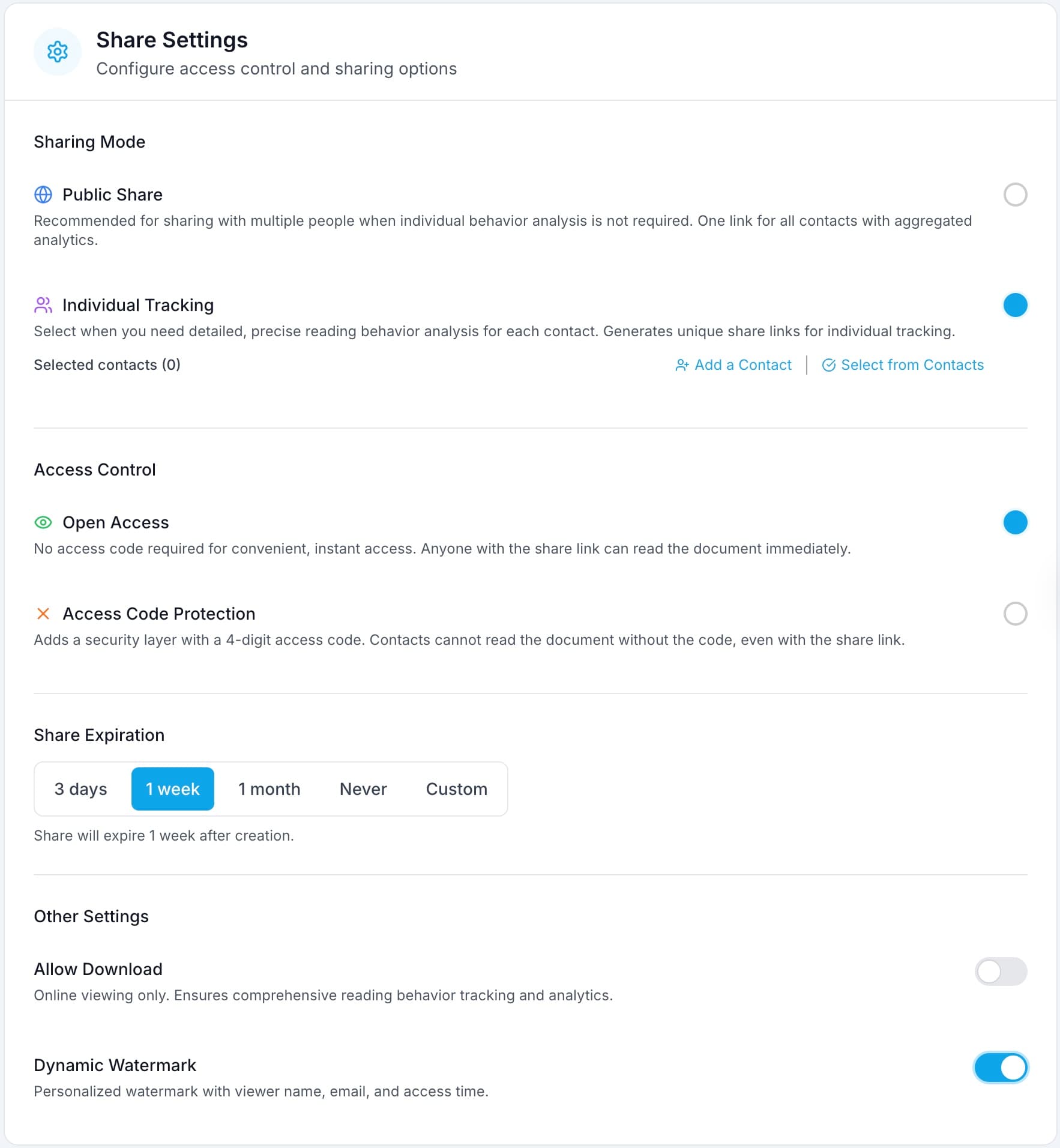
Enable Dynamic Watermark per link alongside access codes, expirations, and download settings.
How DocBeacon watermarking works
Identify every recipient
Select an existing contact or add a new one in Share Settings. Public links default to "Public Link Visitor," and private shares fall back to "Guest Viewer," so every access attempt is labeled.
Stamp the viewing session
When the viewer loads the document, DocBeacon renders "Confidential" plus their identity and a UTC timestamp at a subtle ~10% opacity, then tiles it across every page.
Track and audit engagement
Watermarked sessions pair with document analytics, heatmaps, and audit trails so you always know who opened sensitive files and when.
Where customers rely on watermarks
Sales & RevOps
Share pricing proposals, ROI workbooks, and security responses without losing attribution.
- Contact-level fingerprints on every engagement
- Pairs with engagement analytics and document heatmaps
- Disable downloads to keep journeys view-only
Legal & compliance teams
Protect NDAs, policy updates, and diligence packets with verifiable access history.
- Unique UTC timestamp per open for audit trails
- Link-level passcodes plus watermark for dual control
- Trace screenshots back to the requester fast
Investor & board updates
Watermark fundraising decks and board packets so confidential slides stay off social media.
- Assign a contact per investor share link
- Overlay persists across devices and zoom levels
- Works alongside expirations and view limits
Frequently Asked Questions
What information appears in a DocBeacon watermark?
Each overlay prints "Confidential" plus the viewer's name, email address, and a precise UTC timestamp pulled from the share's assigned contact, so leaks are immediately traceable.
How does DocBeacon know which identity to show?
When you select a contact or audience while creating a share link, their name and email power the watermark. Private shares without contact info show "Guest Viewer," and public links display "Public Link Visitor."
Can recipients remove or hide the watermark?
No. The overlay renders inside the view-only reader with pointer events disabled, so it cannot be toggled off. Screenshots and screen recordings still contain the fingerprint. For maximum control, keep downloads disabled.
Does watermarking impact readability?
Watermarks use the Inter font at ~10% opacity with generous spacing, so documents stay legible while remaining visibly protected-even on mobile.
Will it work on non-PDF files?
Yes. DocBeacon supports PFD, DOC/DOCX, PPT/PPTX, so the watermark grid stays aligned across every format.
Keep every document accountable
Add dynamic watermarks in seconds and combine them with DocBeacon's access controls, heatmaps, and audit trails to protect sensitive work.